

A smart home should simplify your daily life, not add new maintenance tasks to your to-do list. You know the problem: many wireless solutions are practical at first, but dead batteries lead to failure precisely when you want to turn on the light. Moreover, bulky plastic casings often disrupt the aesthetics of your carefully designed rooms. If you want to retrofit a HomeKit switch today, you're looking for a solution that invisibly combines technical precision and minimalist design.
We understand the desire for modernization without construction dust or complicated wiring. In this guide, you will learn how to bring your home up to the technological standard of 2026 without tearing down a single wall or ever changing batteries again. We rely on maintenance-free, kinetic technology that generates energy from the press of a button itself. We will guide you step by step through the setup in the Apple Home App and show you how modern switch modules perfectly integrate into your existing switch program. The result is intelligent lighting control that works reliably without ever demanding your attention for maintenance.
Key Takeaways
- Learn how kinetic energy eliminates battery changes and ensures permanently maintenance-free lighting control.
- Discover the most efficient way to retrofit a HomeKit switch without elaborate drilling or new wiring.
- Compare flush-mounted solutions with smart wall switches to find the perfect balance between technology and design for your home.
- Benefit from a step-by-step guide to physical installation and easy setup in the Apple Home App.
- Achieve a flawless aesthetic through the seamless integration of your smart technology into high-quality switch programs such as the Gira System 55.
Retrofitting HomeKit Switches: Why the Upgrade is Worth It in 2026
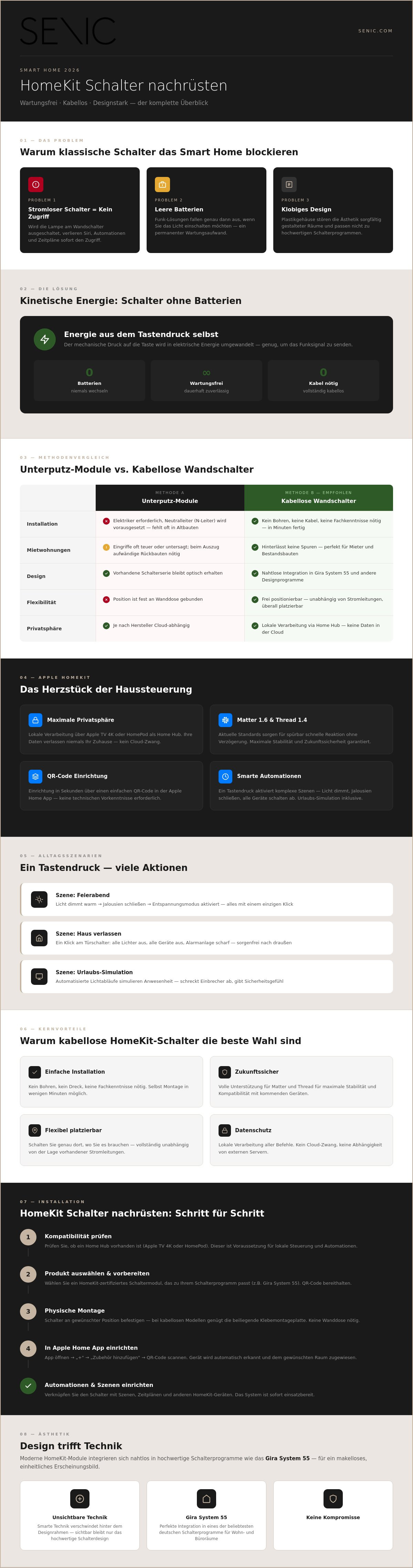
In 2026, retrofitting a HomeKit switch means much more than just replacing hardware. It is the decisive step to bridge the gap between classic electrical systems and modern intelligence. Many smart home users face the same problem: if a smart lamp is switched off via the conventional wall switch, it loses power. Siri, automations, and schedules immediately lose access. The system is then inoperable. Wireless switches permanently resolve this conflict. They allow intuitive operation for all residents, while the intelligent logic remains active in the background at all times.
Especially in rental apartments or existing buildings, flexibility is key. Structural changes to the electrical system are often expensive or simply prohibited. Wireless solutions offer the perfect alternative here. They require no new wiring and leave no traces when you move out. Technology has evolved rapidly since the basics of home automation. With current standards like Matter 1.6 and Thread 1.4, modern switches now respond without noticeable delay. The result is control that feels as natural as a classic light switch but utilizes the full power of the Apple ecosystem.
Comfort and Security Through Smart Automations
Smart switches function as a physical interface for complex processes. A single press of a button activates predefined scenes that go far beyond just lighting. Start your evening by dimming the lights warmly and simultaneously closing the blinds. When leaving the house, a click on the switch by the door is enough to ensure that all devices and lights are off. During your vacation, automated lighting routines simulate your presence. This effectively deters unwanted guests and provides a reassuring sense of security without requiring manual intervention.
HomeKit as the Heart of Home Control
Apple HomeKit convinces with its deep integration and focus on privacy. When you retrofit a HomeKit switch, you benefit from a setup that is completed in seconds via a QR code. Control is local via your Home Hub, such as an Apple TV 4K or a HomePod. This means your data never leaves your home. There is no cloud dependency and no reliance on external servers. In addition, the switches work seamlessly with thousands of other certified devices. This makes the light switch a universal tool for your entire home.
- Easy Installation: No drilling, no mess, no expert knowledge required.
- Future-Proof: Full support for Matter and Thread for maximum stability.
- Flexible: Place the switch exactly where you need it, regardless of power lines.
- Privacy: Local processing of all commands without data transfer to a cloud.
The decision for a wireless system today is a decision for longevity. It's about making technology invisible and integrating it perfectly into everyday life. A modern HomeKit switch is not a technical toy, but a reliable part of your infrastructure that simply works.
Retrofitting Methods: Flush-Mounted Modules vs. Smart Wall Switches
Those who want to modernize their home face a fundamental decision: Should the technology disappear invisibly behind the existing switch, or is a complete change to wireless models more sensible? Both paths lead to the goal when you want to retrofit a HomeKit switch. However, they differ significantly in terms of installation effort, costs, and long-term flexibility.
Flush-Mounted Solutions: When the Electrician Has to Come
Flush-mounted modules are installed directly in the wall box behind the mechanical switch. This sounds ideal at first glance, as the appearance of your current switch series is retained. However, the technical hurdles should not be underestimated. A mandatory prerequisite is the presence of a neutral conductor (N-conductor) in the switch box. In many existing buildings or old apartments, this is often missing, as it was not required for classic switches.
Another problem is the lack of space. In standard flush-mounted boxes, it is often a challenge to safely accommodate the additional module and existing wiring. Since the installation is directly connected to the 230V mains voltage, the work is dangerous for amateurs and should always be carried out by qualified personnel for insurance reasons. This significantly increases the initial costs for the project.
Wireless Switches: Maximum Freedom in Placement
Wireless wall switches represent the most flexible solution for 2026. They operate completely independently of the existing electrical installation. This makes them the perfect choice for smart home retrofitting without cables. Since these switches do not require power from the wall, they can be mounted on glass surfaces, tiles, or wooden furniture. A simple adhesive pad is sufficient.
Particularly practical: you can easily create additional switching points. Do you want to control the light from your bed without having to chisel out new cables? Simply stick another switch to your bedside table. This autonomy makes the system unbeatable for planning modern living concepts. Those who value aesthetic and stress-free integration will find a solution at Senic's products that combines technical expertise with high-quality haptics.
The decision ultimately depends on your living situation. While flush-mounted modules can be an "invisible" solution for homeowners, wireless models offer uncomplicated handling for renters and DIY enthusiasts. Thanks to modern protocols like the Matter standard, wireless variants are now just as responsive and reliable as hardwired components. They eliminate the complexity of installation and offer the freedom to adapt control to new needs at any time.
- Flush-Mounted Modules: High installation effort, specialized personnel required, dependent on N-conductor.
- Wireless Switches: Easy DIY installation, location-independent, ideal for rental apartments.
- Future-Proof: Wireless systems can be easily taken along when moving or redecorating.
The Kinetic Energy Revolution: Switches Without Batteries
Technical development in the smart home sector has reached a point where maintenance-free operation becomes standard. If you want to retrofit a HomeKit switch, you often think of batteries first. But the true innovation lies in kinetics. The principle is called energy harvesting. Every keystroke generates a tiny electrical impulse. This mechanical energy is sufficient to send a radio signal to your central unit. It is self-sufficient technology in its purest form. You need no cables and no chemical energy storage.
The absence of batteries is a decisive advantage for reliability. Conventional wireless switches lose range with decreasing battery voltage or react with a delay. Kinetic models do not experience these signs of fatigue. They work with the same precision after years in a cupboard or after thousands of operations. In addition, the ecological footprint left by the production and disposal of batteries is eliminated. In a modern household with ten or more switches, this means a significant reduction in special waste.
EnOcean and Friends of Hue Technology Explained
The technical basis is often the EnOcean standard. This is optimized for extremely low energy consumption. As soon as you press the switch, a short, encrypted signal is sent. In modern homes, this technology usually uses the Zigbee mesh network. Each smart lamp acts as an amplifier. The signal jumps from device to device until it reaches the receiver. The industry-wide introduction of Matter ensures even better interoperability here. Dead zones are thus a thing of the past, even in massive concrete buildings or across several floors.
Comparison: Battery vs. Kinetics in Everyday Use
In a direct comparison, the superiority of the kinetic solution is evident, especially in the long term. Battery-powered switches incur ongoing costs and require attention. A dead switch in the bathroom or hallway is an unnecessary annoyance. Kinetic switches, on the other hand, are "install-and-forget" solutions. Once mounted, you never have to worry about the hardware again. The independence of kinetic wireless light switches without batteries ensures a smooth user experience that seamlessly integrates into your everyday life. You save time, money, and nerves, while your smart home remains ready for use at all times.
When you retrofit your HomeKit switch, you invest in an infrastructure designed for durability. The mechanics are robust and designed for hundreds of thousands of switching cycles. This is engineering that focuses on the essentials: simplicity and function. A smart switch should not feel like a gadget, but like a reliable part of your home.
- Maintenance-free: Never buy or change batteries again.
- Fail-safe: Constant signal strength regardless of the age of the hardware.
- Sustainable: Active contribution to waste reduction through battery-free technology.
- Cost-efficient: No follow-up costs over the entire lifespan.
Guide: Retrofitting HomeKit Switches Step by Step
Modernizing your lighting control today requires neither a toolbox nor specialized personnel. If you are going to retrofit a HomeKit switch, the focus is on clean preparation and logical linking in your app. Before you begin, make sure your HomeKit hub is active and connected to the same network. An Apple TV 4K or a HomePod acts as the necessary bridge to control automations even when you're away. The installation itself is a process of a few minutes that will permanently change the way you interact with your home.
Physical Installation
Kinetic switches offer you the freedom to choose the mounting location freely. For a durable hold of the adhesive pads, cleaning the surface is essential. Dust and grease on glass, tiles, or wood significantly reduce adhesive strength. A quick wipe with isopropanol ensures the necessary adhesion. Alternatively, the base plates can be screwed directly onto standard flush-mounted boxes if you want to completely replace an old mechanical switch.
Integration into existing switch programs is a decisive aesthetic advantage. Senic switches are compatible with the widely used Gira System 55. They fit seamlessly into existing multi-gang frames. The visual difference to classic switches completely disappears. For patios or garden areas, you should use special outdoor variants. These enable wireless smart lighting control even in damp environments, without having to drill cables through exterior walls.
Software Setup and Automations
Pairing usually takes place via the Philips Hue App or directly via the Apple Home App. Scan the included QR code or use the button combination on the switch to activate pairing mode. Once the device appears in HomeKit, assign it to a room. Now the actual personalization begins. In the Home App, different actions can be assigned to each button. A single click activates the ceiling light. A double click turns off the entire floor. A long press starts a dimmed scene for the evening.
Through complex if-then conditions, you can further automate your home. You can specify that a switch press after 10 PM activates the light at only 10% brightness. The system reacts without delay. It is an efficient way to gain functionality without damaging the building structure. If you want to start modernizing now, you can find the suitable maintenance-free HomeKit switches directly from us.
The project to retrofit a HomeKit switch is thus completed. You have created an infrastructure that does not require batteries and integrates perfectly into your interior. The setup is intuitive, and the result is invisible technology that simply works. A modern home is defined by these small but effective improvements in quality of life.
- Preparation: Check HomeKit hub (Apple TV or HomePod).
- Surface: Clean for optimal adhesion of the adhesive pads.
- Pairing: Scan QR code or use button combination.
- Logic: Define button assignments for click, double-click, and long press.
Design Meets Technology: Seamless Integration into Your Interior
Technology should adapt to the space, not the other way around. If you are retrofitting a HomeKit switch, visual integration is often the biggest hurdle. Many smart solutions on the market rely on cheap plastic and bulky casings. This ruins carefully planned home design and looks like a foreign object on the wall. A high-quality interior demands materials that radiate durability and integrate perfectly both tactilely and technically. The Gira System 55 has established itself as the gold standard here. It offers a modular platform that combines timeless design with technical innovation.
Modern surfaces play a crucial role in the room's effect. Whether minimalist matte black for industrial accents or classic pure white for a subtle look: choosing the right color is essential. It's about a minimalist aesthetic. The technology remains invisible. It is not intrusive but blends into the architecture of the room. A smart switch must feel like a natural part of the wall, not like a gadget attached afterward.
The Importance of Haptic Feedback
A decisive difference between high-quality technology and cheap products is the feel during operation. Touch surfaces often seem sterile and provide no feedback on the switching process. Kinetic switches, on the other hand, offer a defined pressure point. The mechanical click signals precision and value. It is the physical confirmation of an action. This mechanical excellence ensures that smart home use remains intuitive. You can find inspiration for successful integration in our examples for smart home light switch living room designs.
Consistent Appearance Throughout the House
Nothing disturbs visual calm more than a "wild growth" of different switch models. Anyone looking to retrofit a HomeKit switch should pay attention to consistency. Thanks to compatibility with the Gira System 55, you can place smart switches directly next to conventional sockets or switches. They use the same frame and the same material. The observer sees no difference. This uniformity is the key to a professional smart home concept. You invest in a system that will still look modern in ten years and can be expanded at any time.
- Material choice: High-quality plastics and precise manufacturing instead of cheap optics.
- Color variety: Perfect matching of wall colors and interior styles.
- Haptics: Satisfying click feel due to mechanical kinetic modules.
- System loyalty: Full integration into multiple frames and existing programs.
The Future of Light Control in Your Home
The year 2026 marks the end of compromises in home automation. Anyone who wants to retrofit a HomeKit switch today opts for technology that seamlessly integrates into everyday life. Kinetic energy has finally replaced battery changes and annoying maintenance cycles. You gain full control over your lighting without ever having to think about the hardware again. Seamless integration into the Gira System 55 ensures that your walls remain aesthetically pleasing. It is the perfect symbiosis of technical precision and minimalist design.
Modernizing your home has never been so easy and sustainable. By eliminating batteries and cables, you save time, money, and protect the environment at the same time. It is an investment in longevity and comfort that pays off every single day. A smart home should work for you, not the other way around. It's time for a solution that simply works and requires no constant attention.
And intelligent control doesn't stop at the front door: learn more about Charging Shop to integrate your e-mobility into your networked ecosystem with state-of-the-art wallboxes.
Ready for an upgrade without construction? Discover Senic's batteryless HomeKit switches and experience maintenance-free freedom through kinetic technology. The easy, cable-free installation allows you to modernize your home within minutes. Design your light control as individually as your lifestyle.
Frequently Asked Questions about HomeKit Retrofitting
Can I retrofit HomeKit switches without a bridge?
In most cases, you will need a bridge or a Home Hub to retrofit a HomeKit switch. Kinetic switches often use Zigbee or Bluetooth, which requires a central interface to the Apple Home App. An Apple TV 4K or a HomePod mini serves as a stable link. Without this central unit, the switches cannot send commands to other smart devices, as direct communication between the switch and the end device requires a gateway.
Do kinetic switches also work through thick walls?
Kinetic switches work reliably through walls because they use modern radio standards like Zigbee or Thread. In a smart home with multiple smart lamps, a mesh network is established. Each lamp amplifies the signal and relays it. This bridges thick concrete walls or multiple floors without noticeable signal loss. The range indoors is typically up to 30 meters, which is perfectly sufficient for most homes.
What happens to my old light switches if I retrofit?
You can either completely replace your old light switches or supplement them with wireless models. If you use flush-mounted modules, the old switches remain and are extended smartly. With wireless wall switches, the old switches are often permanently bridged with a Wago clamp. This maintains constant power flow for the smart lamps. The new wireless switch is then simply mounted over the old box or in a new location.
Do I need an Apple device as a central unit to use the switches?
For full functionality and secure remote access, an Apple central unit is essential. Since early 2026, an iPad can no longer be used as a Home Hub. You need a HomePod, HomePod mini, or an Apple TV 4K. These devices process your commands locally and protect your privacy. This is the only way to reliably trigger automations and complex if-then scenarios via the switch when you are not at home.
Are HomeKit-compatible switches also compatible with Philips Hue?
Yes, many HomeKit-compatible switches are explicitly compatible with the Philips Hue system. These "Friends of Hue" certified models can be set up directly in the Hue app and automatically appear in Apple Home. This allows seamless control of your Hue lamps and other HomeKit devices with just one press of a button. It is the most efficient way to link different systems without additional software hurdles when retrofitting a HomeKit switch.
Can I also use the switches in the bathroom or outdoors?
Special outdoor variants are designed for outdoor use and in damp rooms. While standard indoor switches are suitable for normal bathrooms, you need weather-resistant models for the garden or terrace. Senic, for example, offers a Single Outdoor Switch that is protected against splash water. This allows you to conveniently control your garden lighting from outside without having to lay cables through the facade. The housing is robust and permanently withstands weather influences.
How many devices can I control with a single HomeKit switch?
With a single switch, you can theoretically control an unlimited number of devices simultaneously. In the Home app, you assign a scene to a button. This scene can dim the lights in the entire living room, close the blinds, and start the music. A single press of a button thus triggers a chain of actions. The number of linked devices does not affect the execution speed thanks to local control, as the command is sent simultaneously to all devices.
What is the difference between Matter and HomeKit for switches?
Matter is a cross-manufacturer standard, while HomeKit describes Apple's smart home system. A Matter-certified switch works seamlessly with Apple Home, but also with Google Home or Amazon Alexa. HomeKit is the software interface where you manage your devices. Matter 1.6 has ensured even simpler setup and greater stability between devices of different brands since mid-2026. It makes hardware selection more flexible and future-proof.

0 comments