

A truly smart wireless HomeKit-compatible switch should function as invisibly and reliably as classic electrical wiring behind the wall. Those who modernize their home do not want to create new maintenance tasks but rather gain real comfort. You probably know the problem all too well. Battery changes on countless devices are annoying. Noticeable delays in wireless transmission disrupt the natural flow of everyday life. Often, the simple plastic design of many smart home components simply doesn't match your high-quality switch series.
We understand this desire for technical perfection and aesthetic tranquility. In this detailed comparison, you will find the ideal solution for your wireless freedom in 2026. We will show you how to build a completely maintenance-free system through kinetic energy and modern standards like Matter 1.6. You will learn everything about seamless integration with Siri and the Home app. Our focus here is on solutions that integrate perfectly with the Gira standard visually. We analyze current technologies, easy installation, and the haptics of leading models so that your smart home finally works without compromise.
Key Takeaways
- Kinetic energy eliminates battery changes, ensuring a permanently maintenance-free smart home.
- Modern HomeKit-compatible wireless switches offer delay-free integration into the Apple ecosystem through Matter 1.6.
- High-quality solutions use the Gira System 55 standard for seamless visual integration into existing switch frames.
- Flexible mounting options through adhesive or screws enable uncomplicated use in rental properties and owner-occupied homes.
- Our comparison analyzes the best models of 2026 based on haptics, range, and technical reliability.
What is a HomeKit-Compatible Wireless Switch and Why Is It Indispensable?
A HomeKit-compatible wireless switch is the crucial element for an intuitive smart home. It acts as a physical bridge between the user and digital control. Unlike traditional light switches, it is completely location-independent. It requires no flush-mounted box and no wiring. This autonomy allows you to place the control exactly where it is needed in everyday life. Whether directly at the head of the bed or on a glass front in the office; the switch adapts to your life, not the other way around.
The technical basis is the Apple HomeKit framework. This architecture ensures that all commands are processed securely and encrypted. Integration is seamless via protocols like Thread or Bluetooth. Many users prefer integration via a Hue Bridge to achieve maximum stability. A single button press can control entire scenarios. A click when leaving the house turns off all lights, lowers the temperature, and closes smart blinds. This saves time and provides a reassuring sense of security.
HomeKit Ecosystem: The Role of the Switch
In a world of voice assistants and smartphone apps, a physical button seems almost classic. Yet it is essential. The haptic feedback and immediate availability without loading time are unbeatable. Guests or children do not need an unlocked iPhone to adjust the light. Automation in the background makes all the difference. A short press activates the "Cinema Scene," a long press turns off the entire floor. Since communication is local, the system remains fully functional even in the event of internet outages. It's technology that works in the background and simply functions.
Retrofitting vs. New Construction: Flexibility Without Wall Chasing
Modernizing existing properties often involves dirt and noise. The topic of smart home retrofitting without cables offers the perfect solution here. You avoid chasing walls and expensive electrician hours. The switches are simply glued on or integrated into existing frames. This is particularly attractive for tenants, as the original condition of the apartment can be restored at any time. The decision for a HomeKit-compatible wireless switch is thus an investment in longevity and aesthetics. High-quality models use the Gira System 55 standard. This allows them to blend invisibly into your existing home design and appear seamless.
Battery vs. Kinetic: The Technological Comparison for HomeKit Switches
The choice of energy source determines long-term satisfaction in your smart home. Conventional models often rely on coin cells like CR2032 or CR2430. While these solutions are flexible, they create a new type of household chore: battery maintenance. A HomeKit-compatible wireless switch with battery operation requires regular checks in the Home app. It is a temporary solution for a permanent need. After two years at the latest, the transmission power decreases, and a replacement becomes unavoidable.
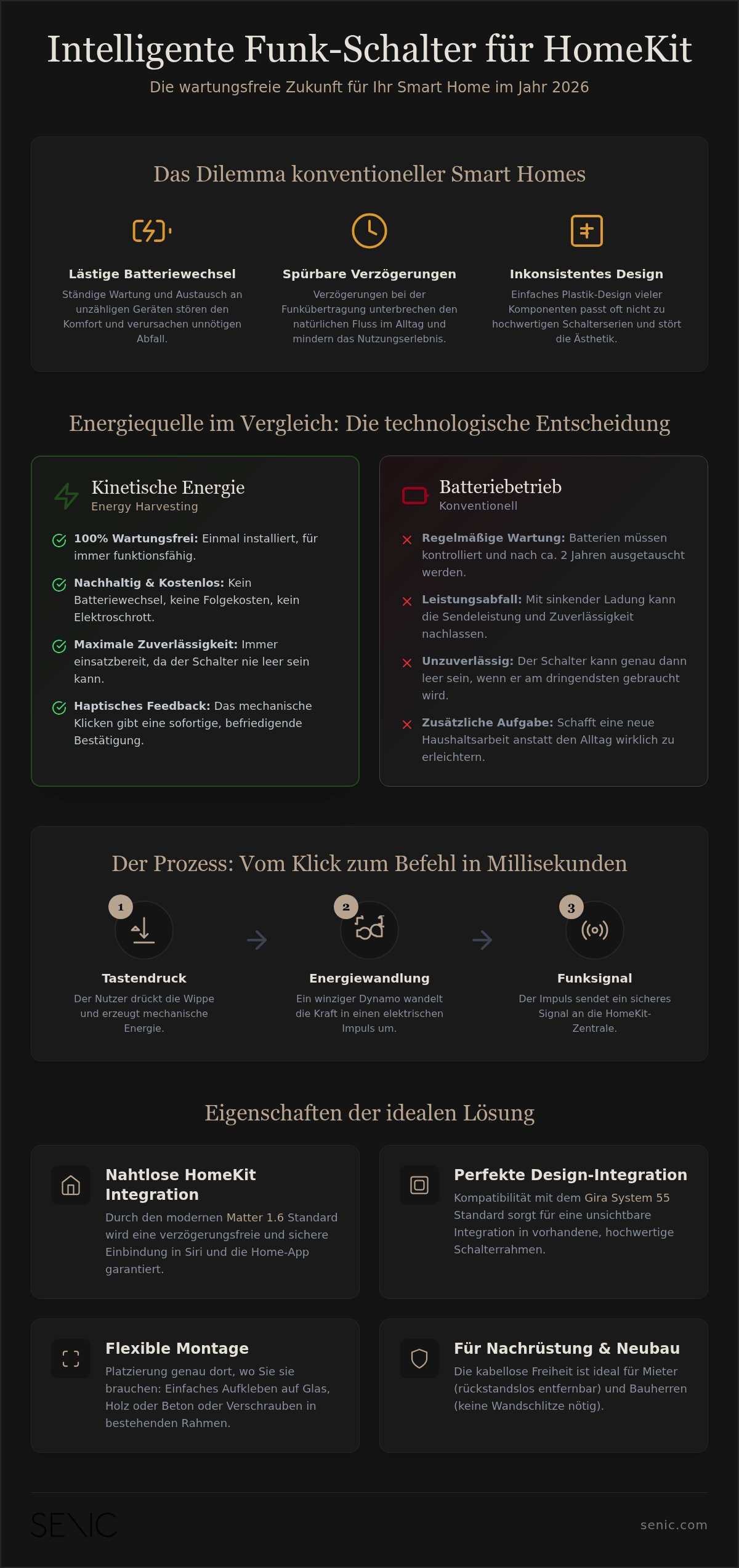
Kinetic switches, on the other hand, use the principle of energy harvesting. They convert the mechanical force of your button press directly into electrical energy. This technology is completely self-sufficient. It requires no chemical storage and no external power supply. This makes the system absolutely maintenance-free. It is the technological answer to the desire for simplicity and durability. Long-term testing shows: battery-free technology is never empty at the wrong moment. It is permanently ready.
How Does Kinetic Energy Work in Light Switches?
At the heart of this technology is a tiny electrodynamic energy converter. When you press the rocker, a magnetic field moves through a coil, inducing a voltage. This ultra-short energy pulse is sufficient to send an encrypted radio signal. Since modern protocols like the Matter connectivity standard are optimized for maximum efficiency, transmission occurs in milliseconds. Haptics plays a central role here. The firm, mechanical click serves as immediate confirmation for the user. It conveys a feeling of solidity and technical precision.
Comparison of Maintenance Costs Over 10 Years
Over a decade, kinetic technology is the more economical and ecological choice. Battery-powered switches not only incur ongoing costs for spare parts. They also produce avoidable special waste. In a household with ten smart switches, over ten years, with a two-year replacement cycle, a total of 50 batteries must be disposed of. Kinetic switches completely eliminate this effort. You invest once in high-quality hardware and then enjoy years of autonomy.
Sustainability in a smart home also means longevity. A maintenance-free system not only relieves the environment but also your daily life. If you value a solution that combines technical excellence with ecological responsibility, you should take a closer look at battery-free options. A HomeKit-compatible wireless switch should ultimately simplify life, not complicate it. It integrates invisibly into everyday life and performs its service without any attention from the user.
Market Overview: The Best HomeKit-Compatible Wireless Switches in Comparison
The market for HomeKit-compatible wireless switches has fundamentally changed due to the Matter interoperability standard. The selection today ranges from simple WLAN solutions for beginners to highly specialized design objects for demanding users. Three factors are particularly important in the decision: connection reliability, aesthetic integration into the living space, and long-term maintenance-free operation. While inexpensive models often compromise on materials, premium solutions focus on durability and proven standards.
Beginners often opt for models from providers like Meross. These WLAN switches impress with an attractive price and direct coupling without an additional bridge. They are functional and serve their purpose for simple switching operations. However, they burden the home 2.4-GHz WLAN, which can lead to noticeable latencies in environments with many networks. In addition, the haptics are usually simple, which can be perceived as disruptive in a high-quality furnished living space.
Senic Friends of Hue: The Design Champion
For users with high demands on aesthetics and haptics, the Philips Hue wireless switches from Senic are the ideal choice. These switches use the established Gira System 55 design. They are visually indistinguishable from classic switch series. Thanks to EnOcean technology, they operate completely battery-free. The energy for the radio signal is generated purely mechanically. This makes them the most sustainable option in comparison. They integrate seamlessly into existing frames and offer the most precise haptics on the market. Installation is flexible by gluing or screwing, which makes them perfect for rental apartments and owner-occupied homes.
Eve Light Switch & Co: Bluetooth and Thread in Check
Native HomeKit specialists like Eve consistently rely on Thread technology. Thread is a modern mesh network that increases the stability of your smart home. Every Thread device with permanent power supply acts as a range extender. Pure wireless buttons benefit from this architecture through extremely short reaction times under 120ms. Without such a mesh network, the range of Bluetooth-based switches is limited. Walls or floors can then quickly weaken the signal. Eve offers solid workmanship but is often tied to a specific design that integrates less flexibly into existing switch frames from other manufacturers.
The choice of the right HomeKit-compatible wireless switch ultimately depends on your existing infrastructure. If you already use a Hue Bridge and value German design craftsmanship, Senic offers the most elegant solution. If you are looking for maximum connectivity in the Thread network, Eve is a strong contender. For simple tasks in individual rooms, cheaper WLAN models are often sufficient, provided your network coverage is stable and you can do without a high-quality material feel.
Decision Aid: Which Wireless Switch Suits Your Living Scenario?
The choice of the right control system largely depends on your living situation and structural conditions. A HomeKit-compatible wireless switch offers specific advantages for every scenario. It's not just about the technology, but about seamless integration into your living space. We distinguish between three central application scenarios that should influence your purchasing decision.
Scenario A: The rented apartment. Here, flexibility is the most important criterion. You don't want to drill holes or lay cables. Adhesive solutions are ideal. These switches can be removed without residue when moving out and immediately reinstalled in the new apartment. The configuration in the Home app remains, which significantly simplifies the relocation of your smart home.
Scenario B: The owner-occupied home. In your own home, aesthetics are paramount. A HomeKit-compatible wireless switch should act as an integral part of the architecture here. Integration into existing switch frames from brands like Gira or Jung ensures a uniform appearance. This way, you combine modern wireless technology with the high-quality design of your remaining electrical installation.
Scenario C: The outdoor area. On the terrace or in the garden, other qualities are required. Here, switches must be protected against moisture and dust. Pay attention to the IP protection class. A Single Outdoor Switch is specifically designed for these conditions and enables outdoor lighting control without having to run cables through exterior walls.
Use this short checklist for your selection:
- Protocol: Does the device support Matter or Zigbee for maximum stability?
- Power Supply: Do you prefer maintenance-free kinetic or battery-powered models?
- Design: Does the switch visually match your existing frames (e.g., System 55)?
- Mounting: Is adhesive mounting possible for your surfaces (glass, wood, wallpaper)?
Installation and Mounting: It's That Easy
Commissioning is done in a few minutes. After unpacking, you add the device via the QR code in the Apple Home app. Installing a smart home compatible light switch requires no specialist knowledge. For optimal signal strength, do not place the switch directly on metal surfaces. Ideally, a HomeKit hub or bridge should be nearby to minimize latencies.
Troubleshooting: What to Do in Case of Delays?
If switching commands are delayed, this is often due to the radio range. Smart light sources nearby can act as repeaters and amplify the Zigbee signal. Regularly check for firmware updates in the respective manufacturer's app. These updates often improve stability in the Apple network. In rare cases, changing the radio channel on your router or hub can resolve conflicts with the 2.4-GHz WLAN.
If you are looking for a solution that combines technical design with absolute reliability, you will find our high-quality HomeKit switches for your project here.
Senic: The Maintenance-Free Premium Solution for HomeKit Users
Senic has positioned itself as a leading provider for users who demand technical autonomy and exclusive design. A HomeKit-compatible wireless switch from Senic is far more than just a control element. It is a statement of durability. Manufacturing takes place in Germany. This guarantees short delivery routes and the highest precision in processing. It is the perfect addition to any smart home that values details and absolute reliability.
Technical integration is effortless. You configure the button assignment according to your individual needs via the Philips Hue app. Thanks to automatic synchronization, the switch appears immediately in the Apple Home app. There, you assign scenes or specific devices to it. This double compatibility offers maximum flexibility. You use the stability of the Hue Bridge and the intuitive control of the Apple ecosystem simultaneously. It is a solution that thinks ahead and adapts to your rhythm.
Gira System 55: Aesthetics Without Compromise
The Gira Switch Philips Hue concept is based on the widely used System 55 standard. This standard allows the switch to be harmoniously integrated into existing frame programs. It is flush with the wall. It appears as an integral part of the architecture, not as an add-on gadget. Whether in matte anthracite for modern accents or classic pure white; the surfaces are haptically high-quality and durable. You choose between glossy and matte variants to perfectly accentuate the lighting design of your room.
Focus on Maintenance-Free Operation
Through innovative kinetic technology, Senic solves the problem of dead batteries once and for all by having each button press generate the necessary energy for the radio signal itself. Mechanical components replace vulnerable chemical storage here. This ensures enormous longevity. There are no maintenance intervals and no unexpected failures. This robustness makes the switch a future-proof investment. It functions just as precisely today as it will for many years to come. Sustainability is lived here through technical excellence and the avoidance of disposable batteries.
Discover the Senic Single Indoor Switch for your home. It's the clean, elegant, and durable solution for your Apple HomeKit ecosystem. Embrace technology that remains invisible and simply works perfectly. After all, a HomeKit-compatible wireless switch shouldn't be a chore, but rather enrich your everyday life through simplicity.
Shaping the Future of Wireless Control
Choosing a high-quality HomeKit-compatible wireless switch marks the transition from a maintenance-intensive gadget system to a professional infrastructure. Kinetic energy has established itself as the standard for modern households, as it avoids chemical waste and maximizes reliability. You'll never again have to monitor battery status in your Home app or face a dead switch at a crucial moment. The seamless integration into the Gira System 55 Standard ensures that the visual tranquility of your rooms is completely preserved. It's the perfect symbiosis of traditional haptics and digital intelligence.
Your smart home should serve you without demanding your time for maintenance. Discover Senic's battery-free HomeKit switches and opt for a solution that's ready to use in under 2 minutes. These switches offer you the freedom to control lights and scenes exactly where you need them; without cables and without compromising on design. Take the next step towards a sustainable and aesthetically sophisticated home that simply works. Enjoy creating your personal wireless freedom.
Frequently Asked Questions
Do I need a bridge for HomeKit-compatible wireless switches?
Whether a bridge is required primarily depends on the wireless protocol used by the device. While Wi-Fi models often communicate directly, EnOcean-based solutions like those from Senic require a Philips Hue Bridge as an intermediary to the Apple system. This bridge ensures that your HomeKit-compatible wireless switch remains functional and that commands are reliably processed even over longer distances. For professional setups, this architecture offers significantly higher reliability than direct Bluetooth connections.
Can kinetic switches also dim?
Kinetic switches support dimming through individual button configuration in the Home app or Hue app. You simply assign actions to the rockers for holding or multiple presses to continuously adjust brightness. Although the switch has no internal battery, the mechanical impulse of the button press is sufficient to securely transmit the brightness change command. This way, you enjoy full convenience without any maintenance.
What is the range of wireless switches in the house?
Experience shows that the indoor range is about 20 to 30 meters, depending on the building structure. Solid walls or metal reinforcements can attenuate the signal and shorten the distance. However, since modern smart home systems use mesh networks via Zigbee or Thread, other powered devices often act as signal boosters. This significantly increases the effective range and ensures reliable switch response on every floor of your home.
Do Senic switches work without an internet connection?
Yes, Senic switches control your devices locally and do not rely on an active internet connection. Communication takes place directly via the bridge within your local network, guaranteeing an immediate response. An internet connection is only necessary for initial setup, firmware updates, or remote access. This local autonomy is a crucial security advantage, as your lighting remains operable at all times, even if your router or provider fails.
Can I control multiple lights simultaneously with one switch?
A single button press can easily activate an unlimited number of lights or scenes simultaneously. In the Apple Home app, you group various light sources into a group or scene and link them to your switch. With a HomeKit-compatible wireless switch, you can control all the lighting in a room or the entire house with just one click. The software logic allows highly flexible combinations for every everyday situation.
How many button assignments are possible with HomeKit switches?
The number of control commands depends on the hardware and software configuration. A classic double switch offers four physical contact points, each of which can be assigned individual actions in HomeKit. Many models also support distinguishing between short and long button presses, which doubles the number of available commands per rocker. This allows for very precise control of complex scenarios via a single haptic interface.

0 comments